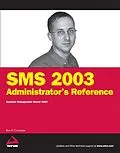
* Systems Management Server (SMS) 2003 is Microsoft's centralizedadministration tool that IT departments use to remotely deployapplications, apply security patches, and provide IT hardware andsoftware inventory management and asset control* Each chapter features a task and an outline for what is to beaccomplished, along with the functionality that is required, thetools or scripts that are necessary, and the ideal results* A common environment is presented throughout the text to allowreaders to become familiar with it as they advance through thechapters* Featured tasks include standardizing and replicating sitesettings, hardware and software inventory, software metering,reporting software updates, and troubleshooting
Autorentext
Ron Crumbaker has an Electrical Engineering degree but found himself in the Information Technology field. Ron is a huge Chevrolet Camaro fan and was greatly disappointed when GM decided to pull the plug on the Camaro. Ron currently owns two Camaros, a 1967 SS350 and a 1994 Z28. Ron has three children Nate, Abby, and Cole and a wife, Martha. Ron is very active in his church and community and is an ordained deacon in a Southern Baptist Church. Ron is also the CTO for myITforum.com, Inc., and is a two-time Microsoft MVP in the Windows Server System, SMS.
Klappentext
SMS 2003 Administrator's Reference
As the core technology essential to IT departments for managing desktop hardware and software in a Windows environment, Systems Management Server (SMS) 2003 is the hot Microsoft tool of choice for applying security patches, installing applications, and applying updates. This book discusses the steps you need to take to ensure that SMS 2003 is administered successfully to provide powerful management across an enterprise.
While the main focus is on SMS 2003 with Service Pack 1, author and Microsoft MVP Ron Crumbaker also covers SP2 while guiding you through the inner workings of SMS 2003 to help you gain control of all the aspects of systems management. Each chapter uses real-world examples and covers an SMS feature and an administrative task, ultimately showing you how you can use SMS 2003 to successfully administer an SMS 2003 environment.
You'll start working with SMS 2003 and this book by setting up your site hierarchy. From there you'll move on to managing SMS roles and security. You'll do extensive work with clients, discovering and inventorying resources and metering software use. Along with seeing the power of collections and packages, you'll learn to work with SMS reports to give you a structures view of your SMS data and to interpret SMS messages to keep the system running smoothly. The book wraps up by introducing some of the third-party extensions you can add to SMS to solve specific additional needs and gives you the power of automating repetitive SMS functions with scripts.
What you will learn from this book
- How to secure SMS and maintain secure SMS infrastructure, accounts, and communication
- Using the SMS 2003 discovery methods to detect and inventory information across your networks
- Improving the process of delivering Windows and Microsoft Office updates with the Inventory Tool for Microsoft Updates (ITMU)
- Ways to configure policies to enable or disable "agents" on assigned SMS 2003 clients
- What an SMS software package is and how to create, use, and distribute packages to update software on clients
- How to best use third-party solutions to extend SMS functionality
- Techniques for configuring software metering to track client program usage to make the most of your software budget
- Best troubleshooting practices starting with preventing problems and understanding SMS status messages
- How to provide console and web-based reporting with dashboards and custom reports for hardware, software, sites, users, and more
Who this book is for
This book is for the SMS administrator who needs to manage the ever-increasing demands for operation excellence at the desktop and server level.
Wrox Administrator's Reference guides are planned and written by working technologists to meet the real-world needs of IT professionals. Focused and relevant, they address the issues technology professionals face every day. They provide examples, practical solutions, and expert education in new technologies, all designed to help IT professionals do a better job.
Zusammenfassung
- Systems Management Server (SMS) 2003 is Microsoft's centralized administration tool that IT departments use to remotely deploy applications, apply security patches, and provide IT hardware and software inventory management and asset control
- Each chapter features a task and an outline for what is to be accomplished, along with the functionality that is required, the tools or scripts that are necessary, and the ideal results
- A common environment is presented throughout the text to allow readers to become familiar with it as they advance through the chapters
- Featured tasks include standardizing and replicating site settings, hardware and software inventory, software metering, reporting software updates, and troubleshooting
Inhalt
Acknowledgments.
Introduction.
Chapter 1: Setting Up Your Site Hierarchy.
Overview.
Site Hierarchy.
SMS Server Roles.
Connecting Child Sites to Parent Sites.
Installing a Secondary Site.
Attaching a Child Site to a Parent Site.
Site Boundary Management.
Roaming Boundaries.
Active Directory.
Summary.
Chapter 2: Specifying and Managing Site System Roles.
Management Point.
Client Access Point.
Distribution Point.
Distribution Point Groups.
Protected Distribution Points.
Server Locator Point.
Reporting Point.
Summary.
Chapter 3: Managing SMS Security.
Security Modes.
Advanced Security Mode.
Standard Security Mode.
Security Levels.
SQL Security.
WMI Security.
IIS Security.
Standard Security Mode.
Advanced Security Mode.
SMS Accounts.
Common Accounts for Both Modes.
Providing a Secure Infrastructure.
Configuring Connection Accounts.
Client Connection Accounts.
Site System Connection Accounts.
Managing Object/Class Level Security Rights.
Summary.
Chapter 4: Configuring Site Settings.
Addresses.
Senders.
Component Configuration.
Software Distribution.
Status Reporting.
Management Point.
Site Maintenance.
SQL Commands.
Summary.
Chapter 5: Specifying Discovery Methods.
Windows User Account Discovery.
Windows User Group Discovery Method.
Heartbeat Discovery Method.
Network Discovery Method.
Active Directory System Discovery.
Active Directory User Discovery.
Active Directory System Group Discovery.
Third-Party Discovery Tools.
Enhanced System Discovery.
Enhanced AD User Discovery.
Summary.
Chapter 6: Enabling Client Agent Settings.
What Is an Agent?
The Hardware Inventory Agent.
The Software Inventory Agent.
The Remote Tools Client Agent.
Advertised Programs Client Agent.
Software Metering Client Agent.
Site Maintenance Software Metering tasks.
Summary.
Chapter 7: Client Installation Methods.
Client Push Installation.
Client Installation through Group Policy.
Manually Installing the Client Using CCMSetup.exe.
Command-Line Switches.
Installation Properties.
Prestaging the SMS Client on a Desktop…